Recommended Git Workflow for Solo Development
- EN
- JA
Table of Contents
A Git-based workflow is important even for solo development. Git makes version control and code history management easier.
This article explains a recommended Git workflow for solo development.
#
Workflow Overview
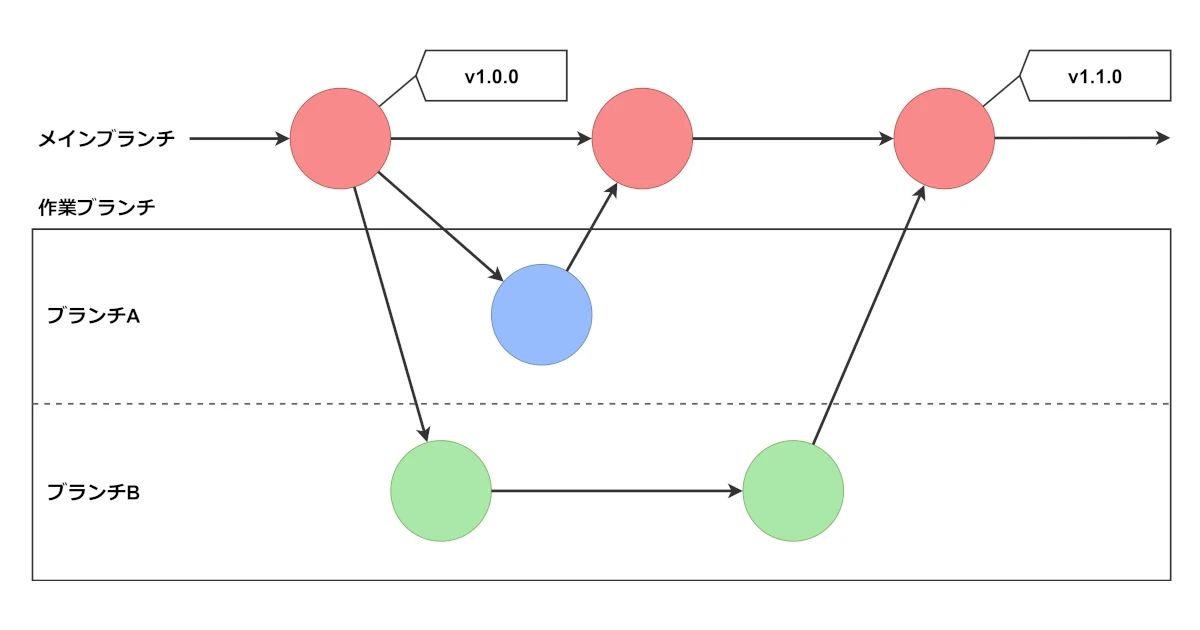
In this workflow, you create a working branch for each feature or bug fix, develop on that branch, and finally merge it into the main branch.
To implement a new feature, the developer creates a working branch and develops on it. Once the feature is complete, it is merged into the main branch. This approach lets the developer work in an environment separated by feature and minimizes the impact on the production environment.
#
Create a Working Branch from the Main Branch
Create a separate branch for each feature or bug fix and check it out before making changes. Try to choose a branch name that is easy to understand later.
git checkout <main-branch>
git checkout -b <working-branch>
This creates and checks out a working branch from the main branch.
#
Develop on the Working Branch
Add features or fix bugs on the working branch you created. After changing the code, add the modified files, then commit and push the changes.
git add <filename>
git commit
git push origin -u <working-branch>
The changes are now reflected in the remote repository.
#
Merge Changes into the Main Branch
When development is complete, merge the changes into the main branch.
git checkout <main-branch>
git merge <working-branch>
git push
The changes from the working branch are merged into the main branch and reflected in the remote repository.
#
Delete the Working Branch
Having many unnecessary branches reduces the visibility and maintainability of the project’s branches.
Therefore, delete working branches that are no longer needed after merging them into the main branch.
git branch -d <working-branch>
git push -d origin <working-branch>
This deletes the branch from both the local and remote repositories.
#
Create a Version Tag
Because changes to the main branch are made by feature, it can be difficult to determine which revision was released in this workflow.
Creating a version tag for the revision at release time clarifies the relationship between revisions and releases, making release management easier.
git tag <release-version>
git push origin <release-version>
This creates a tag with the release version name and reflects it in the remote repository.