Enable SSH Access on Raspberry Pi OS
- EN
- JA
Table of Contents
Raspberry Pi OS is an operating system for Raspberry Pi devices provided by the Raspberry Pi Foundation. Enabling SSH access allows you to access your Raspberry Pi remotely.
This article explains how to enable SSH access on Raspberry Pi OS.
#
Launch the Configuration Tool
Run the following command to launch the Raspberry Pi configuration tool.
sudo raspi-config
#
Enable the SSH Server
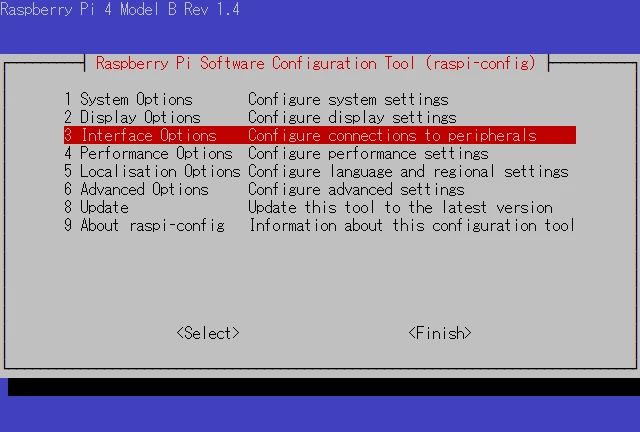
After running the command, the configuration screen is displayed. Move the cursor to Interface Options and press Enter.
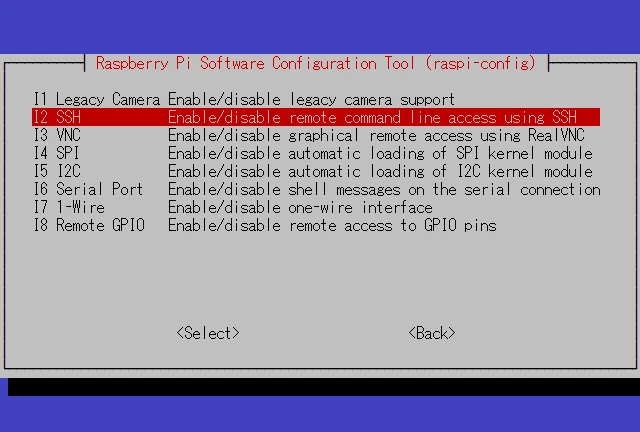
The interfaces for which you can enable or disable settings are displayed. Move the cursor to SSH and press Enter.
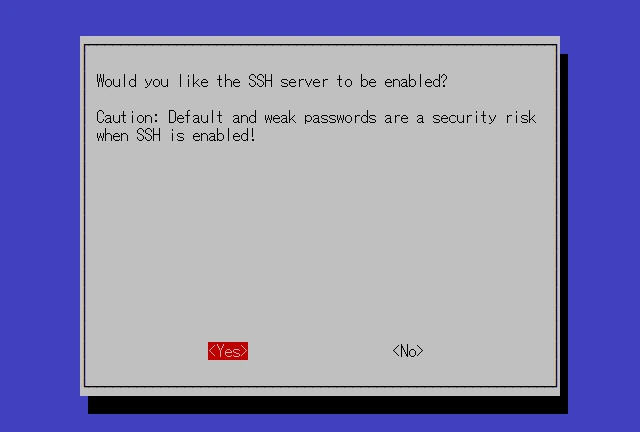
You are asked whether to enable the SSH server. Select Yes.

The SSH server is enabled. Press Enter to return to the top of the configuration screen.
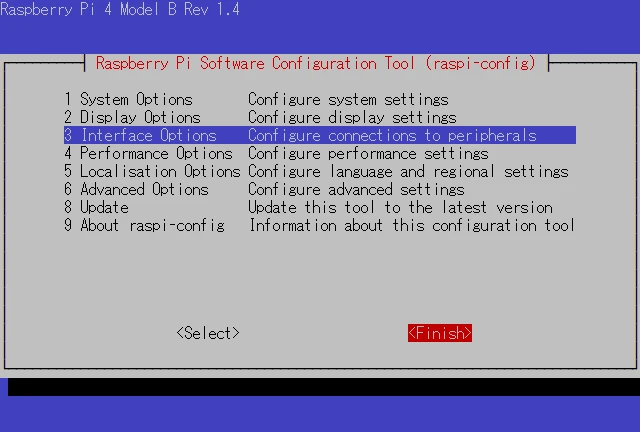
Select Finish to close the configuration tool.
#
Restart the SSH Server
Run the following command to restart the SSH server.
sudo systemctl restart ssh
SSH access is now enabled on Raspberry Pi OS. You can access the Raspberry Pi remotely over SSH from another computer.